
What Is TruBalance?
TruBalance is CardTotal's real-time pacing engine. Every time you open the app it looks at your current billing cycle — how many days have passed, how much you've spent, and what your Max Monthly Spend Goal is — and calculates whether you're on track to close the cycle within budget.
The core output is a Daily Budget: the amount you can spend per remaining day and still land on your goal. If you spend more than that on a given day, TruBalance flags you as “behind pace.” If you spend less, you're ahead.
That signal is only useful if the numbers feeding it are clean. A $2,400 flight booked in day 3 of a 31-day cycle would make your average daily spend look catastrophic for the rest of the month — even if the rest of your spending is completely normal. That's the problem the Outlier Threshold solves.
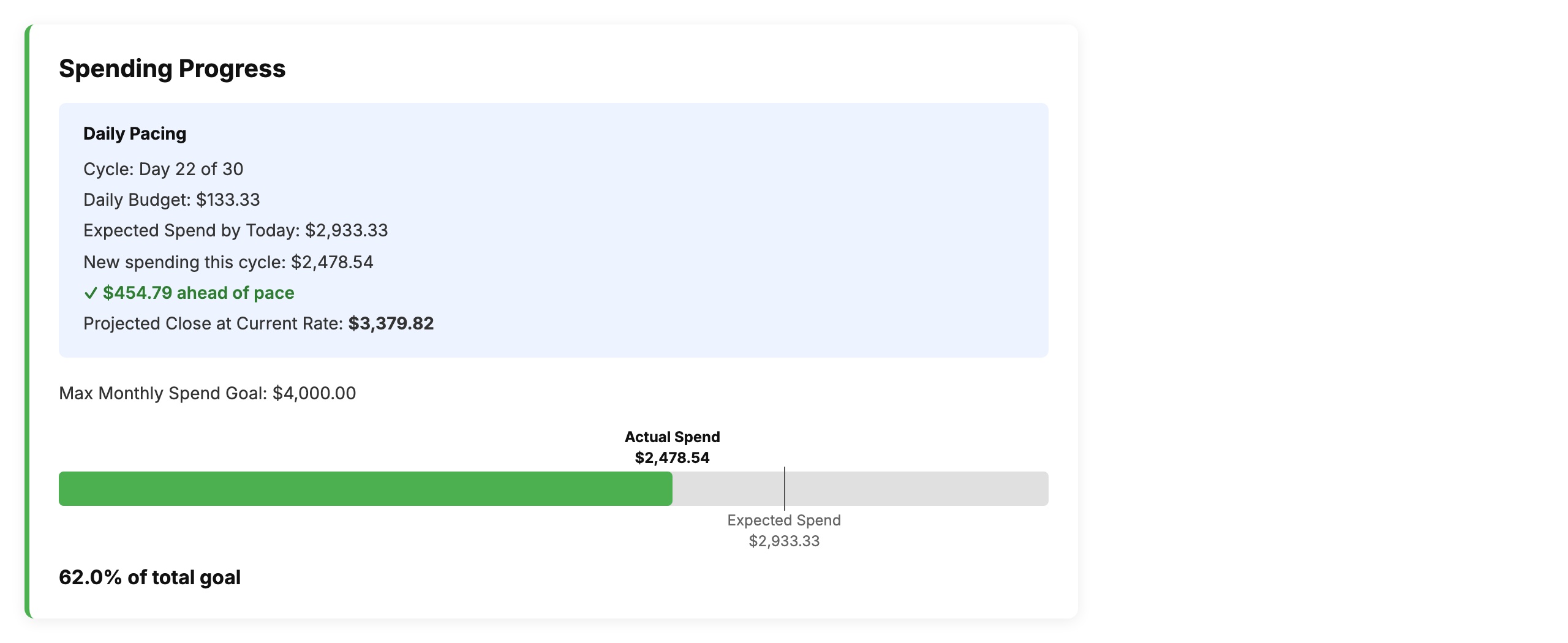
The Spending Progress card — daily pacing, projected close, and a visual budget bar.
How Daily Pacing Works
TruBalance divides your Max Monthly Spend Goal by the number of days in your billing cycle to get a Daily Budget. Each day it multiplies that by the number of days elapsed to get an Expected Spend by Today.
It then compares that expected figure against your actual “new spending this cycle” — charges posted since your last statement close. The gap between those two numbers is your pace delta: positive means you're ahead, negative means you're behind.
The Projected Close at Current Rate takes your current spend and extrapolates it across the remaining days. If you're on Day 27 of 31 and have spent $5,521, your projected close is simply your current spend — there are very few days left to move the number materially.
The Outlier Threshold Setting
The Outlier Threshold is a dollar value you set in CardTotal's settings. Any single transaction that exceeds this threshold is flagged as a planned expense — a one-time charge that doesn't reflect your everyday spending pattern.
When TruBalance calculates your daily pacing, it excludes outlier charges from the running average. This means a $1,800 flight booking won't inflate your daily spend rate and won't distort your projected close date. The charge still counts toward your total — it's reflected in your actual spend and your progress bar — but it doesn't poison the pacing signal.
CardTotal analyzes your transaction history and suggests a threshold calibrated to your actual spending patterns. If your typical daily spend rarely exceeds $150 but you occasionally have $500+ charges, the suggestion will sit somewhere around that natural inflection point.
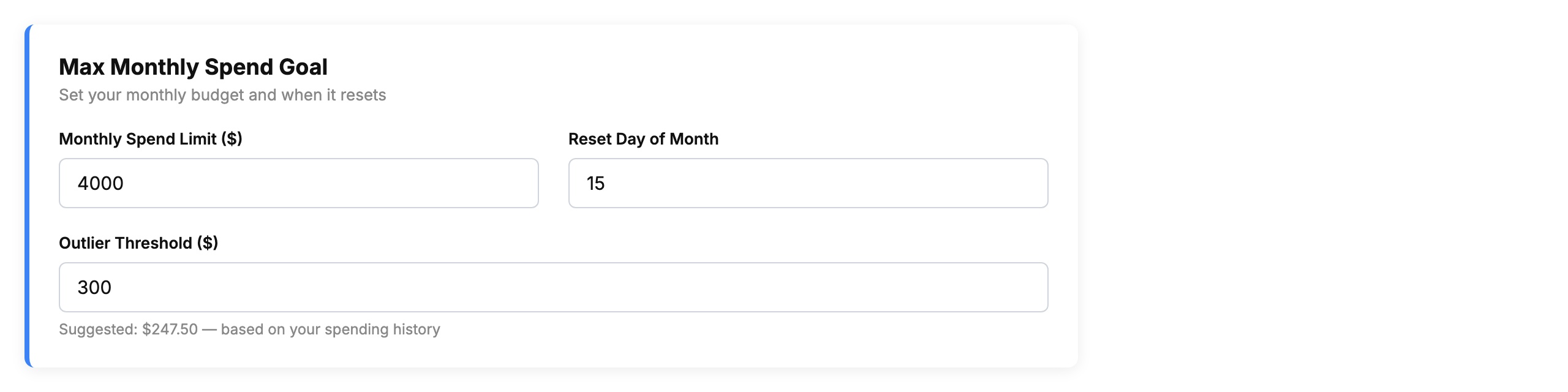
The settings card — set your monthly limit, reset day, and outlier threshold. CardTotal suggests a threshold value based on your transaction history.
How to Tune Your Threshold
The suggested value is a starting point. You should adjust it based on how you actually use your cards:
- Set it lower if you want more charges treated as planned expenses — useful if you have frequent medium-sized purchases (e.g., $200–$400 recurring bills) that shouldn't skew your daily pace.
- Set it higher if you want only truly exceptional charges excluded — useful if your everyday spending is already variable and you don't want too many transactions filtered out of the pacing calculation.
- Leave it at the suggestion if you're not sure — it's calculated from your real history and will be accurate for most people most of the time.
The threshold applies globally across all your tracked cards. You can revisit it any time from the settings screen.
Why Accurate Pacing Matters
A pacing signal that's constantly wrong stops being useful. If TruBalance tells you you're “$1,800 behind pace” every day in January because you booked a trip in week one, you'll start ignoring the alert — and then you'll miss the real signals too.
The goal of CardTotal isn't to generate anxiety about every large purchase. It's to give you a clear, honest read on your everyday spending momentum so you can make small adjustments before the cycle closes — not panic at the end.
The Outlier Threshold is the mechanism that keeps that signal trustworthy over time. Set it once, let CardTotal suggest a value, and your pacing numbers will reflect how you actually spend — not how one flight booking makes it look.